
Security Dashboard for AI Overview
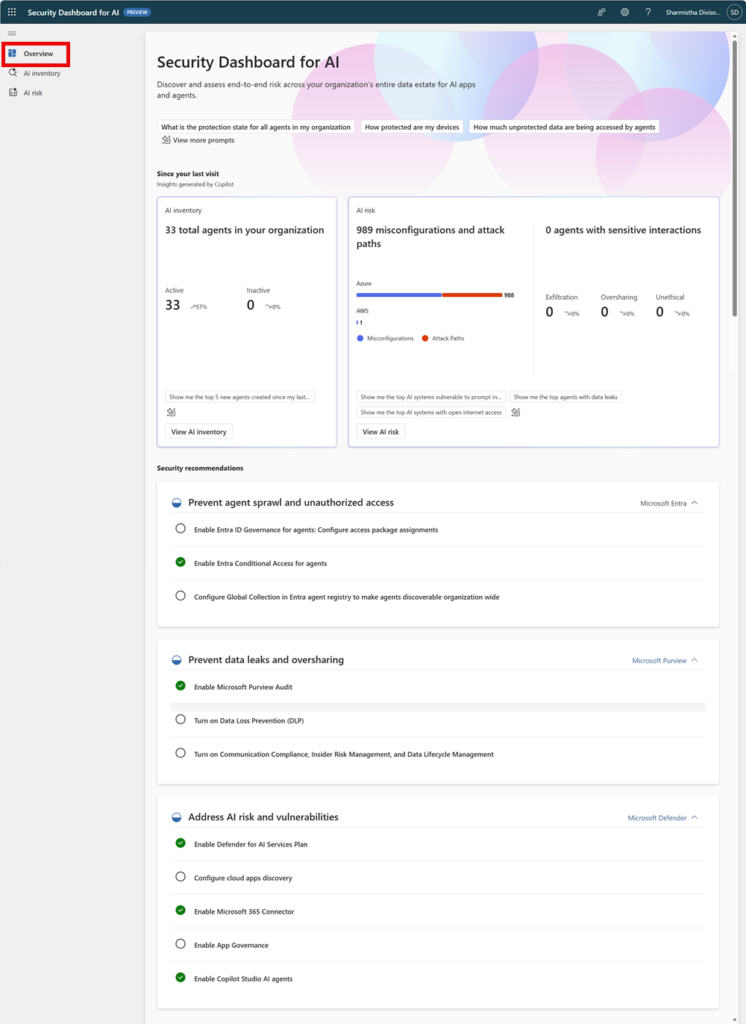
Security Dashboard for AI is a unified, real‑time dashboard that aggregates AI security posture and risk across Microsoft security products — including Microsoft Entra, Microsoft Defender, Microsoft Purview, and Microsoft Security Copilot — to help organizations discover AI assets, prioritize risks, and drive remediation. 1
Core Capabilities and What It Shows
- Real‑time AI risk visibility: Aggregates signals across identity, data, cloud, and app security to present a consolidated AI posture. 1
- Comprehensive AI inventory: Discovers and catalogs AI assets such as Microsoft 365 Copilot, Copilot Studio agents, Foundry apps, third‑party models (OpenAI, Google Gemini), MCP servers, and other AI applications. 1
- Risk categories and prioritization: Surfaces identity and access risks, data security risks, cloud posture issues, misconfigurations and attack paths, and agents with sensitive interactions. 1
- Recommendations and remediation paths: Provides prescriptive recommendations and direct links into the relevant Microsoft product consoles for remediation. 1
- Copilot integration: Uses Microsoft Security Copilot to generate prompt‑based exploration, summaries, and suggested investigative prompts to accelerate analysis. 1
Roles Required and Data Access Levels
By default, Global Administrators have full access. The dashboard also exposes scoped views to built‑in Microsoft Entra roles so teams can delegate tasks while preserving least privilege. 1
| Role | Overview Cards | AI Inventory | AI Risk Page |
| Global Administrator | View all summary cards; delegate recommendations. | Full access to agents, models, MCP servers, apps. | Full access to all risk categories. |
| AI Administrator | View most overview cards; delegate recommendations. | View AI agents and apps; limited model visibility. | View identity, data, cloud, and agent risks. |
| Security Administrator | View overview cards; delegate recommendations. | View agents, apps, MCP servers. | View identity, data, cloud, misconfiguration risks. |
| Compliance Administrator | View overview cards; delegate some recommendations. | View agents and apps; limited model/MCP visibility. | View data and identity risks; limited cloud risk view. |
| Global Reader | Read‑only overview cards and delegation instructions. | Read‑only inventory for agents and apps. | Read‑only risk summaries. |
| Agent ID Administrator | Limited overview visibility; can configure agent registry. | Limited inventory access; agent registry tasks. | Not full risk visibility. |
| Agent Registry Administrator | Limited overview visibility. | Limited inventory access; manage registry collection. | Not full risk visibility. |
Use this table to map responsibilities and delegate remediation without exposing unnecessary data. 1
How It Helps Security Teams and CISOs
- Faster discovery and reduced blind spots: Centralized inventory uncovers managed, unmanaged, and shadow AI agents and apps so teams can prioritize high‑risk assets. 1
- Operational alignment: Direct links to Entra, Defender, and Purview let analysts pivot to the right product for remediation, preserving existing workflows while adding AI context. 1
- Actionable governance: Executive‑ready analytics and compliance insights support board reporting and risk conversations with measurable metrics. 1
- Improved triage with Copilot: Prompt‑driven exploration and AI‑summaries speed investigations and reduce analyst time to decision. 1
- Delegation and accountability: Built‑in delegation lets security leaders assign remediation tasks to teams or individuals and notify them via Outlook or Teams, improving closure rates. 1
Implementation Guidance and Recommended Next Steps
- Confirm prerequisites: Ensure Entra, Defender, and Purview sensors are deployed; the dashboard will indicate missing capabilities and how to enable them. 1
- Map roles to responsibilities: Assign Global Admins for initial review, then delegate day‑to‑day remediation to AI Administrators, Security Administrators, and Compliance Administrators as appropriate. 1
- Run an initial discovery: Use the AI inventory to identify high‑risk agents, models, and MCP servers; export filtered views for targeted analysis. 1
- Integrate into BAU: Feed prioritized recommendations into SOAR playbooks and ticketing systems; use Copilot prompts to accelerate analyst onboarding. 1
- Report up: Use executive analytics for board and risk committee reporting to demonstrate measurable improvements in AI security posture. 1
Risks, Limitations, and Operational Considerations
- Dependency on underlying sensors: Visibility and recommendations depend on Entra, Defender, and Purview being deployed and configured; gaps will limit dashboard coverage. 1
- Role design matters: Misaligned role assignments can expose sensitive model or agent details; follow least‑privilege delegation patterns. 1
- Change management: New telemetry and recommendations can increase alert volume; plan a phased rollout and tune playbooks to avoid analyst overload. 1
Final Recommendation
Adopt the Security Dashboard for AI as the central governance pane for AI risk: enable required Microsoft security sensors, map roles to the dashboard access model, run an initial discovery, and integrate prioritized recommendations into existing SOAR and IR workflows to turn AI visibility into measurable security outcomes. 1
References (1)
- Assess your organization’s AI risk with Microsoft Security Dashboard …. https://learn.microsoft.com/en-us/security/security-for-ai/security-dashboard-for-ai
- Image Credit – Microsoft Learn